Шаблоны это основа дизайна вашего сайта. Шаблоны представляют собой обычные *.php файлы в которые вставляются инструкции
позволяющие управлять отображением контента. Если вы знаете html то вам достаточно взять готовый шаблон идущий в поставке
и отредактировать html код не трогая инструкции заключенные между символами
<? ?>
чтобы получить готвый к работе сайт
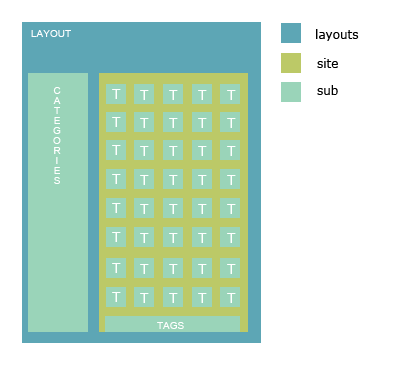
Шаблоны расположены в папке templates. Существует три типа шаблонов (подпапки layouts, site, sub). Рассмотрим их назначение:
Схематичная взаимосвязь между разными типами шаблонов
В квадратные скобки [] заключены необязательные параметры. В скобках указана область применения команды (L - layout, С - шаблон контента (папка site), S - субшаблон)
<?=Inxy::action()?>
(LCS)
<?=Inxy::category()?>
(LCS)
<?=Inxy::categoriesByCtr(['categories_by_ctr'[, 300]])?>
(LC)
<?=Inxy::categoriesByLastClicks(['categories_by_last_clicks'[, 300]])?>
(LC)
<?=Inxy::categoriesByName(['categories_by_name'[, 300]])?>
(LC)
<?=Inxy::description()?>
(LC)
<?=Inxy::ifActionMatch(val, [true = 'highlight'[, false = 'default']])?>
(LC)
<?=Inxy::ifAllMatch([true = 'highlight'[, false = 'default']])?>
(LC)
<?=Inxy::ifCategoryMatch(val, [true = 'highlight'[, false = 'default']])?>
(LC)
<?=Inxy::ifMovMatch([true = 'highlight'[, false = 'default']])?>
(LC)
<?=Inxy::ifPicMatch([true = 'highlight'[, false = 'default']])?>
(LC)
<?=Inxy::ifTagMatch(val, [true = 'highlight'[, false = 'default']])?>
(LC)
<?=Inxy::isAll() ?>
(LC)
<?=Inxy::isMov() ?>
(LC)
<?=Inxy::isPic() ?>
(LC)
<?=Inxy::join(items, template, separator) ?>
(LC)
<?=Inxy::keywords()?>
(L)
<?=Inxy::name()?>
(L)
<?Inxy::orderByCtr()?>
(C)
<?Inxy::orderByDater()?>
(C)
<?=Inxy::paginator()?>
(C)
<?Inxy::setLayout(name)?>
(C)
<?Inxy::setThumbSub(name [, use_prefix = false])?>
(C)
<?=Inxy::tag()?>
(LC)
<?=Inxy::tagsByName(offset, limit, template)?>
(LC)
<?=Inxy::tagsByWeight(offset, limit, template)?>
(LC)
<?=Inxy::title()?>
(L)
<?=Inxy::test([count = 1])?>
(C)
<?=Inxy::thumb([count = 1])?>
(C)
<?=Inxy::total()?>
(L)
<?=Inxy::totalNew()?>
(L)
<?=Inxy::tplUrl()?>
(LCS)
<?=Inxy::url(template)?>
(LCS)
<?=Inxy::virtual()?>
(L)Using request you can detect and output current user's location
Example:
<?=Inxy::req()->action?>
current template
<?=Inxy::req()->page?>
current page
<?=Inxy::req()->gal_id?>
current gallery id
<?=Inxy::req()->tag?>
current tag
<?=Inxy::req()->category?>
current categoryВ квадратные скобки [] заключены необязательные параметры.
<?=$thumb->categories?>
<?=$thumb->click_url?>
<?=$thumb->description?>
<?=$thumb->gallery_url?>
<?=$thumb->gallery_url?>
<?=$thumb->height?>
<?=$thumb->img_url?>
<?=$thumb->publish_dt?>
<?=$thumb->title?>
В квадратные скобки [] заключены необязательные параметры.
<?=$thumb->url?>
<?=$thumb->src_url?>
<?=$thumb->media?>
Since version 1.06 you can create custom error pages for http errors raised by script (404, 502 etc)
To create custom error page:
Layout is similar to any other layout you have, but some function unavailable (Inxy::title(), Inxy::description(), Inxy::paginator()).
Template example:
<?php $messages = array(

    404 => "Page not found",
    503 => "Server busy",

)?>
<h1><?=$e->status?></h1>
<p><?=isset($messages[$e->status]) ? $messages[$e->status] : "Unknown error"?></p>
WARNING THIS IS IS AN EXPERIMENTAL EXTENSION!
Using sphinx you can easy add search to you Iinxy site.
source domain_name
{
	type		= mysql
	sql_host	= localhost
	sql_user	= your_inxy_db_user
	sql_pass	= your_inxy_db_pass
	sql_db		= your_inxy_db

	sql_query				= \
		SELECT rt.rotation_id, title, categories, tags, description, rt.content_type_id \
		FROM gals g JOIN rotation rt ON rt.gal_id = g.gal_id WHERE g.status_id = 3 AND g.disabled_sum = 0 AND rt.category_id IN (1,2,3)

	sql_attr_uint = content_type_id

	sql_query_info	= SELECT * FROM rotation WHERE rotation_id=$id
}
<?
return array(
  "host" => "localhost",
  "port" => 3312,
  "index" => "sphinx_index_name"
);
?>
<form action="/">
<input type="text" name="q">
<input class="submit" type="submit"  value="Find" />
</form>
<?=Inxy::req()->search?>
to output search request