Templates defines disign of your site. INXY templates are *.php files with special instructions.
If you are fimilar with HTML you can take standart templates and edit HTML to get site ready for use. Its
important to leave unchanged instuctions between
<? ?>
tags.
Templates located in templates directory. Threre are three types of templates layouts, site and sub.
Templates interaction scheme
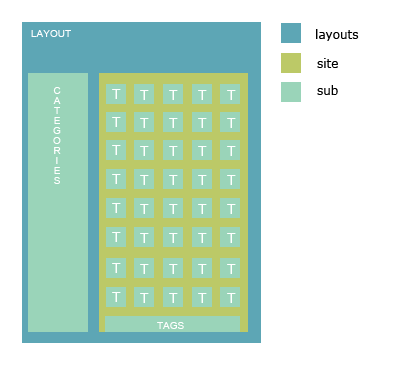
Optional params - [], Template type - (). L - layout, С -content template, S - subtemplate
<?=Inxy::action()?>
(LCS)
<?=Inxy::category()?>
(LCS)
<?=Inxy::categoriesByCtr(['categories_by_ctr'[, 300]])?>
(LC)
<?=Inxy::categoriesByLastClicks(['categories_by_last_clicks'[, 300]])?>
(LC)
<?=Inxy::categoriesByName(['categories_by_name'[, 300]])?>
(LC)
<?=Inxy::description()?>
(LC)
<?=Inxy::ifActionMatch(val, [true = 'highlight'[, false = 'default']])?>
(LC)
<?=Inxy::ifAllMatch([true = 'highlight'[, false = 'default']])?>
(LC)
<?=Inxy::ifCategoryMatch(val, [true = 'highlight'[, false = 'default']])?>
(LC)
<?=Inxy::ifMovMatch([true = 'highlight'[, false = 'default']])?>
(LC)
<?=Inxy::ifPicMatch([true = 'highlight'[, false = 'default']])?>
(LC)
<?=Inxy::ifTagMatch(val, [true = 'highlight'[, false = 'default']])?>
(LC)
<?=Inxy::isAll() ?>
(LC)
<?=Inxy::isMov() ?>
(LC)
<?=Inxy::isPic() ?>
(LC)
<?=Inxy::join(items, template, separator) ?>
(LC)
<?=Inxy::keywords()?>
(L)
<?=Inxy::name()?>
(L)
<?Inxy::orderByCtr()?>
(C)
<?Inxy::orderByDater()?>
(C)
<?=Inxy::paginator()?>
(C)
<?Inxy::setLayout(name)?>
(C)
<?Inxy::setThumbSub(name [, use_prefix = false])?>
(C)
<?=Inxy::tag()?>
(LC)
<?=Inxy::tagsByName(offset, limit, template)?>
(LC)
<?=Inxy::tagsByWeight(offset, limit, template)?>
(LC)
<?=Inxy::title()?>
(L)
<?=Inxy::test([count = 1])?>
(C)
<?=Inxy::thumb([count = 1])?>
(C)
<?=Inxy::total()?>
(L)
<?=Inxy::totalNew()?>
(L)
<?=Inxy::tplUrl()?>
(LCS)
<?=Inxy::url(template)?>
(LCS)
<?=Inxy::virtual()?>
(L)Using request you can detect and output current user's location
Example:
<?=Inxy::req()->action?>
current template
<?=Inxy::req()->page?>
current page
<?=Inxy::req()->gal_id?>
current gallery id
<?=Inxy::req()->tag?>
current tag
<?=Inxy::req()->category?>
current category[] - optional params
<?=$thumb->categories?>
<?=$thumb->click_url?>
<?=$thumb->description?>
<?=$thumb->gallery_url?>
<?=$thumb->height?>
<?=$thumb->img_url?>
<?=$thumb->publish_dt?>
<?=$thumb->title?>
[] - optional params
<?=$thumb->url?>
<?=$thumb->src_url?>
<?=$thumb->media?>
Since version 1.06 you can create custom error pages for http errors raised by script (404, 502 etc)
To create custom error page:
Layout is similar to any other layout you have, but some function unavailable (Inxy::title(), Inxy::description(), Inxy::paginator()).
Template example:
<?php $messages = array(

    404 => "Page not found",
    503 => "Server busy",

)?>
<h1><?=$e->status?></h1>
<p><?=isset($messages[$e->status]) ? $messages[$e->status] : "Unknown error"?></p>
WARNING THIS IS IS AN EXPERIMENTAL EXTENSION!
Using sphinx you can easy add search to you Iinxy site.
source domain_name
{
	type		= mysql
	sql_host	= localhost
	sql_user	= your_inxy_db_user
	sql_pass	= your_inxy_db_pass
	sql_db		= your_inxy_db

	sql_query				= \
		SELECT rt.rotation_id, title, categories, tags, description, rt.content_type_id \
		FROM gals g JOIN rotation rt ON rt.gal_id = g.gal_id WHERE g.status_id = 3 AND g.disabled_sum = 0 AND rt.category_id IN (1,2,3)

	sql_attr_uint = content_type_id

	sql_query_info	= SELECT * FROM rotation WHERE rotation_id=$id
}
<?
return array(
  "host" => "localhost",
  "port" => 3312,
  "index" => "sphinx_index_name"
);
?>
<form action="/">
<input type="text" name="q">
<input class="submit" type="submit"  value="Find" />
</form>
<?=Inxy::req()->search?>
to output search request