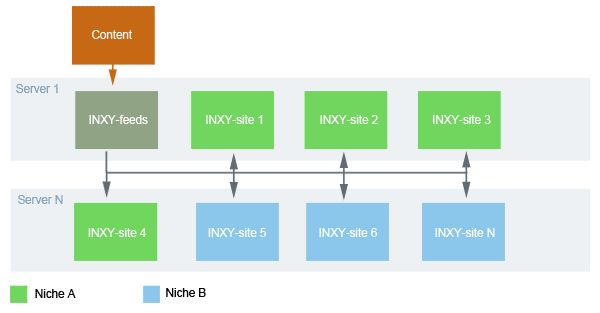
- All time - за все время
- Last 24H - за последние 24 часа
Rerank
Rotation
Content
Galleries
Manage galleries. Text entered into top input filed matches with gallery URL, title and description. All filters applies only after Find botton clicked
Bottom buttons functions
- Disable selected - disable selected galleries (all media files and statistics keeps)
- Enable selected - enable selected galleries
- Use global - use INXY-feeds settings
- Reset (make new) - Reset rotation statistics and recreate thumbs
- Full delete - delete gallery media files, rotation statistics. Gallery will be added again if feed restarted
Categories
Список категорий, справа находится переключатель типов категорий. В зависимотси от выбранного типа в нижней части грида распологаются кнопки:
- Add - добавляет категорию
- Delete - удаляет категорию
- Ban - забанить категорию, например через импорт добавляется галерея имеющая категории А и Б, если категория А была забанена, то после завершения импорта галерея будет иметь одну категорию Б. Если обе категории забанены, то галерея не будет добавлена вообще.
- Restore - разбанить категорию, или отменить назначение синонима
См. так же типы категорий
Sponsors
Paysites
Settings
General
- Site name - any stings e.g 'my tube site!'
- Description - site description
- Date format - Date format for thumbs, use MySQL format http://dev.mysql.com/doc/refman/5.1/en/date-and-time-functions.html#function_date-format
- FHG templates - check when craete own galleries
- Disable site - if checked all traffic redirects to redirect url
- Redirect url - redirect url if site is disabled
- Daily amount - количество галерей которое необходимо сделать за 24 часа
- Thumbs rerank interval - через сколько показов необходимо делать реранк тумб в категории
- Thumbs rerank params - левое положение ползунка (Last CTR) сортирует тумбы во время реранка используя количество кликов и показов прошедшее между реранками, правое положение (Total CTR) использует клики и показы накопленные за все время показа тумбы.
- Thumbs rerank test limit - количество показов которое должна набрать тумба чтобы считаться протестированной
- Categories rerank interval - через сколько показов необходимо делать реранк категорий между собой
- Categories rerank params - то же самое что и для тумб
- Categories visibility min - минимальное количество галерей в категории для того чтобы она появилась в списках категорий (меню и т. д.)
- Use cache - если отмечена то содержимое страниц кэшируется на диск
- INXY-feeds url - УРЛ фидера
Медиа
Media type default: default media type for your site (main page content)
Thumbs size - group 'Mixed' - thumbs dimensions for page with pictures and movies Enable: - create thumbs for group 'mixed'
Thumbs size - group 'Picture' - thumbs dimensions for page with pictures Enable: - create thumbs for group 'Picture'
Thumbs size - group 'Movie' - thumbs dimensions for page with movies Enable: - create thumbs for group 'Movie'
Preview images - previews dimensions for self-hosted picture galleries
Media storage
- url: url to thumbs storage directory
- dir: thumbs storage directory
Convert
- params: ImageMagic params
- path to: path to convert
Трэйд
Default trade out: trade script out string
mixed: trade script out string for group 'mixed'
picture: trade script out string for group 'picture'
movie: trade script out string for group 'movie'
Задачи
Доступ
Системные
Лицензия
Tools
General
Upgrade
Feeds
System
Logs
Выберите тип лога и нажмите view для просмотра. Кнопка clear очищает лог выбранного типа. Система хранит 100 последних логов каждого событияTemplates
Intro
Templates defines disign of your site. INXY templates are *.php files with special instructions.
If you are fimilar with HTML you can take standart templates and edit HTML to get site ready for use. Its
important to leave unchanged instuctions between
<? ?>
tags.
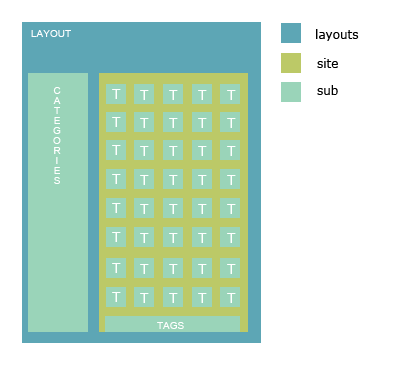
Templates located in templates directory. Threre are three types of templates layouts, site and sub.
- Layout its main template what contains all content. Site header, main menu, footer is usual parts of layout.
- Site template is a page body. Its part of content that changes form page to page.
- Subtemplates are the small pieces of html code that contant at any part of page e.g. thumbs and links, tag links etc
Templates interaction scheme
Commands list
Optional params - [], Template type - (). L - layout, С -content template, S - subtemplate
<?=Inxy::action()?>(LCS)- Outputs name of current content template (action)
<?=Inxy::category()?>(LCS)- Outputs name of current category
<?=Inxy::categoriesByCtr(['categories_by_ctr'[, 300]])?>(LC)- Outputs list of categories ordered by CTR using categories_by_ctr.php subtemplate
<?=Inxy::categoriesByLastClicks(['categories_by_last_clicks'[, 300]])?>(LC)- Outputs list of categories ordered by last clicks using categories_by_last_clicks.php subtemplate
<?=Inxy::categoriesByName(['categories_by_name'[, 300]])?>(LC)- Outputs list of categories ordered by name using categories_by_name.php subtemplate
<?=Inxy::description()?>(LC)- Outputs site description for pages with tumbs or gallery description at gallery page
<?=Inxy::ifActionMatch(val, [true = 'highlight'[, false = 'default']])?>(LC)- Retunrs true if current action matches with val overwise returns false. Use it to set diffrent CSS styles for active and not active items of menu
<?=Inxy::ifAllMatch([true = 'highlight'[, false = 'default']])?>(LC)- Retunrs true if current group matches with All overwise returns false. Use it to set diffrent CSS styles for active and not active items of menu.
<?=Inxy::ifCategoryMatch(val, [true = 'highlight'[, false = 'default']])?>(LC)- Retunrs true if current category matches with val overwise returns false. Use it to set diffrent CSS styles for active and not active items of menu.
<?=Inxy::ifMovMatch([true = 'highlight'[, false = 'default']])?>(LC)- Retunrs true if current group matches with Pic overwise returns false. Use it to set diffrent CSS styles for active and not active items of menu.
<?=Inxy::ifPicMatch([true = 'highlight'[, false = 'default']])?>(LC)- Retunrs true if current group matches with Pic overwise returns false. Use it to set diffrent CSS styles for active and not active items of menu.
<?=Inxy::ifTagMatch(val, [true = 'highlight'[, false = 'default']])?>(LC)- Retunrs true if current tag name matches with val overwise returns false. Use it to set diffrent CSS styles for active and not active items of menu.
<?=Inxy::isAll() ?>(LC)- Returns true if current group name is All, false overwise.
<?=Inxy::isMov() ?>(LC)- Returns true if current group name is Mov, false overwise.
<?=Inxy::isPic() ?>(LC)- Returns true if current group name is Pic, false overwise.
<?=Inxy::join(items, template, separator) ?>(LC)- Joins array of items using subtemplate with name template and separator.
<?=Inxy::keywords()?>(L)- Outpust autogenerated keywords
<?=Inxy::name()?>(L)- Outpusts site name form settings
<?Inxy::orderByCtr()?>(C)- Set CTR thumbs order
<?Inxy::orderByDater()?>(C)- Sets date thumbs order
<?=Inxy::paginator()?>(C)- Outputs paginator
<?Inxy::setLayout(name)?>(C)- Sets layout name for use
<?Inxy::setThumbSub(name [, use_prefix = false])?>(C)- Sets subtemplate for thumbs
<?=Inxy::tag()?>(LC)- Outputs current tag
<?=Inxy::tagsByName(offset, limit, template)?>(LC)- Uses template subtemplate for output tags ordered by name. Starts from offset and outpust maximum limit number of tags
<?=Inxy::tagsByWeight(offset, limit, template)?>(LC)- Uses template subtemplate for output tags ordered by weight. Starts from offset and outpust maximum limit number of tags
<?=Inxy::title()?>(L)- When page with thumbs then outputs site title when gallery page outputs gallery title when category page and category title is set then outputs category title
<?=Inxy::test([count = 1])?>(C)- Outputs count of test thumbs
<?=Inxy::thumb([count = 1])?>(C)- Outputs count of thumbs
<?=Inxy::total()?>(L)- Outputs number of galleries
<?=Inxy::totalNew()?>(L)- Outputs number of galleries created in last 24 hours
<?=Inxy::tplUrl()?>(LCS)- Relative url to directory with templates
<?=Inxy::url(template)?>(LCS)- Outputs url for action
<?=Inxy::virtual()?>(L)- Replacement for php virtual function name which is incompatible with INXY
Request
Using request you can detect and output current user's location
Example:
<?=Inxy::req()->action?>current template<?=Inxy::req()->page?>current page<?=Inxy::req()->gal_id?>current gallery id<?=Inxy::req()->tag?>current tag<?=Inxy::req()->category?>current category
Thumb object properties list
[] - optional params
<?=$thumb->categories?>- Array of categories names
<?=$thumb->click_url?>- Click url (using trade script)
<?=$thumb->description?>- Gallery description
<?=$thumb->gallery_url?>- Direct link to gallery
<?=$thumb->height?>- Image width
<?=$thumb->img_url?>- Image height
<?=$thumb->publish_dt?>- Publish date
<?=$thumb->title?>- Gallery title
Preview object properties
[] - optional params
<?=$thumb->url?>- Link to image generated by INXY-scripts
<?=$thumb->src_url?>- Link to original image
<?=$thumb->media?>- Link to media object
Custom error pages
Since version 1.06 you can create custom error pages for http errors raised by script (404, 502 etc)
To create custom error page:
- Create layouts/error.php layout
- Create system/error.php template
Layout is similar to any other layout you have, but some function unavailable (Inxy::title(), Inxy::description(), Inxy::paginator()).
Template example:
<?php $messages = array(

    404 => "Page not found",
    503 => "Server busy",

)?>
<h1><?=$e->status?></h1>
<p><?=isset($messages[$e->status]) ? $messages[$e->status] : "Unknown error"?></p>
Search
WARNING THIS IS IS AN EXPERIMENTAL EXTENSION!
Using sphinx you can easy add search to you Iinxy site.
- Create sphinx source
source domain_name { type = mysql sql_host = localhost sql_user = your_inxy_db_user sql_pass = your_inxy_db_pass sql_db = your_inxy_db sql_query = \ SELECT rt.rotation_id, title, categories, tags, description, rt.content_type_id \ FROM gals g JOIN rotation rt ON rt.gal_id = g.gal_id WHERE g.status_id = 3 AND g.disabled_sum = 0 AND rt.category_id IN (1,2,3) sql_attr_uint = content_type_id sql_query_info = SELECT * FROM rotation WHERE rotation_id=$id } - Create sphinx index
- Create config inxy/var/config/sphinx.php. Example:
<?
return array(
  "host" => "localhost",
  "port" => 3312,
  "index" => "sphinx_index_name"
);
?> - Add to cron command to update you index
- Add to your template this code
<form action="/">
<input type="text" name="q">
<input class="submit" type="submit"  value="Find" />
</form>
-
Create template site/search.php, use
<?=Inxy::req()->search?>to output search request
Appendixes
FAQ
How to create own galleries?
- Add embed, flv, fhg (pic) or fhg(pic+mov) galleries to INXY-feeds
- Open INXY-feeds/Main and add this types to domain
- Go to domain's INXY-site/Settings/Generel and check 'use FHG templates'
- Edit templates site/pic.php and site/mov.php
How to choose thumbs size for import?
INXY-site использует указанные урлы картинок чтобы сделать тумбы, соотвественно если картинки будут больше тумб то качество будет лучше, черезмерно большие картинки преведут к лишнему расходу траффика и ресурсов сервера
Glossary
Categories
Категория (синоним ниша) - признак назначенный галереи для того чтобы объъеденить галереи с схожим контентом. Примеры: Teens, Blowjob, MILFCategory types
В INXY-feeds есть три типа категорий
- Normal - обычные категории, при добавлении галереи назначаются ей 'как есть'
- Synonyms - синонимы. Например категория А является синонимом категории Б. В базу добавляется галерея с категориями А, С. После добавления галерея будет иметь категории Б, С.
- Banned - такие категории игнорируются при добавлении галереи, например если категория А забанена и добавляется галарея с категориями А, Б, C то в базу фидера попадут только Б и С.
Stream
Стрим это дополнительный (помимо категории) признак галереи. Иногда недостаточно только категории чтобы определить какие галереи передавать на сайт. Например категория Anal может быть классической, а может быть Gay. Для того чтобы разделить такие категории вводится дополнительный признак.
Есть три стрима:
- General
- Gay
- Shemale